


How to Sit at a Desk Without Back Pain: A Pain Specialist’s Honest Guide
Share this Post
Here is the short answer: there is no such thing as perfect posture. You cannot sit your way out of back pain with one magic position. What actually works is a three-part approach. Fix the setup that forces you to hunch. Break up static sitting every 15 to 20 minutes. Then build the core and posterior chain strength that supports your spine for the long run.
I’m Dr. Richard Kang, a double board certified anesthesiologist and fellowship trained interventional pain management specialist. I treat desk-related back pain every single day at Core Medical & Wellness in New Jersey. This guide covers what I actually tell my patients, plus the red flags that mean it’s time to see someone like me.
Table of Contents
- Why Your Desk Job Is Hurting Your Back
- The Laptop Hunch: The Worst Mistake I See
- The Truth About “Perfect Posture”
- Why a New Chair Alone Won’t Fix You
- How to Set Up Your Desk: The Numbers That Matter
- The 15 to 20 Minute Rule
- Strengthen the Pillar: Your Core and Posterior Chain
- Red Flags: When Back Pain Needs a Doctor
- What Non-Surgical Treatment Looks Like
- Frequently Asked Questions
Why Your Desk Job Is Hurting Your Back
Desk-related back pain is a daily occurrence in my clinic. Our lifestyles have become sedentary, and our spines are paying the price.
The typical patient I see is 45 to 55 years old with a desk job. They have been hurting for years, not weeks. Most of them have spent all that time working in a poor ergonomic position without realizing the damage was adding up.
By the time they reach me, they have usually tried everything on their own. Over-the-counter medications. Stretching routines. Exercises from the internet. Many have also done physical therapy and maintenance chiropractic care. The pain keeps coming back because the daily cause never went away.
The Laptop Hunch: The Worst Mistake I See
If I had to name the single most damaging desk habit, it would be hunching over a laptop.
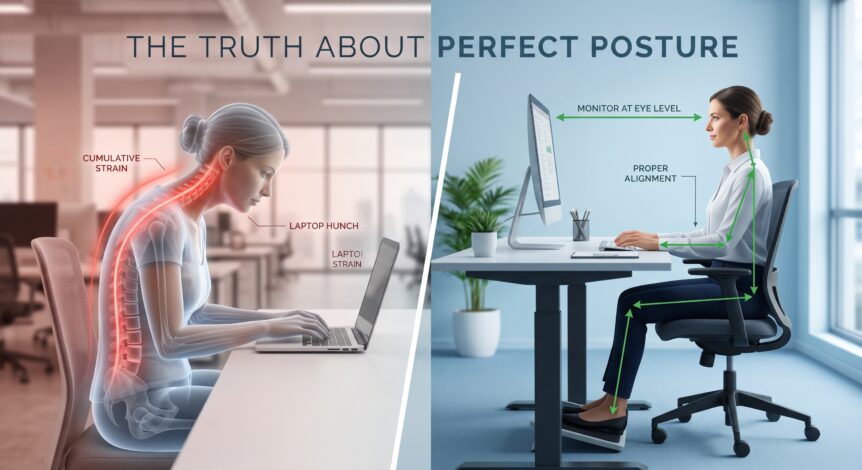
A laptop forces a bad trade. The screen and keyboard are attached, so you cannot position both correctly at the same time. Look down at the screen and your neck strains forward. Reach for the keys and your shoulders round. Hold that shape for eight hours a day and the load on your spine becomes cumulative.
That is the key word: cumulative. One afternoon hunched over a laptop will not injure you. Years of it cause not only back pain but neck pain as well. Add a poor seat and a poor office desk chair, and you have the exact patient profile I see every day.
Clinical takeaway: The best single upgrade for most desk workers is moving from a laptop to a desktop setup with the monitor at eye level and an adjustable height desk and chair. In my experience, that change has done the most to help patients reduce desk-related pain.
The Truth About “Perfect Posture”
Here is where I disagree with a lot of popular advice. There is no such thing as perfect posture.
Every spine is different. If you already have disease in the spine, like degenerative disc changes or arthritis, it will always alter the dynamics and physics of how your body carries load. A textbook position that works for one person may be unrealistic or even uncomfortable for another.
So stop chasing a single perfect position. Chase better positions, held for shorter periods, with more movement in between.
One more honest warning. The posture industry is full of gadgets. I generally recommend things that help people. However, products that make outrageous claims are a red flag, and you should probably stay away from them.
Why a New Chair Alone Won’t Fix You
Patients are often surprised when I tell them the ergonomic chair is only half the fix. The other half is retraining the body, a process called neuromuscular re-education.
Here is the problem. Your body subconsciously reverts to whatever position feels pain-free in the moment. That position is often not ergonomically or anatomically correct. It just feels okay right now, while quietly loading the wrong structures.
In other words, your body lies to you. Comfort is not the same as correct.
That is why we have to actively teach patients how to get into a better position and hold it until it becomes the new default. You can buy the best chair on the market, but if your nervous system keeps pulling you back into the old hunch, the chair cannot save you.
How to Set Up Your Desk: The Numbers That Matter
For the specific measurements, I defer to the occupational health experts. OSHA publishes detailed computer workstation guidelines, and they line up with what works for my patients.
| Workstation Element | OSHA Recommendation |
|---|---|
| Monitor height | Top of screen at or slightly below eye level. Screen center about 15 to 20 degrees below horizontal eye level. |
| Viewing distance | 20 to 40 inches from your eyes to the screen. |
| Elbows | Close to the body and bent at about 90 degrees. |
| Shoulders | Relaxed, not shrugged or rounded forward. |
| Head and neck | Vertical and in line with the spine, not bent or twisted. |
| Chair and desk | Adjustable height, with your back supported and feet flat on the floor. |
Notice what this setup eliminates: the laptop hunch. If you must use a laptop, connect it to an external monitor and keyboard so the screen can sit at eye level while your elbows stay at 90 degrees.
The 15 to 20 Minute Rule
This is the advice I give patients word for word. Do not stay in any sedentary or static position for longer than 15 to 20 minutes. Get up and move.
The best position is always the next position. Your spine is built for movement, and even a great ergonomic setup becomes a problem when you freeze in it for hours.
Occupational health research supports this. Ergonomics researchers at Cornell University developed a pattern called the 20-8-2 rule for desk workers. Sit for 20 minutes, stand for 8 minutes, then move for 2 minutes, and repeat throughout the day. The exact numbers matter less than the principle. Frequent, brief changes of position beat any single posture.
Try this today: Set a repeating timer for every 20 minutes. When it goes off, stand up, walk a few steps, or stretch for a minute or two. Then sit back down in a good position. That reset is also how you practice the neuromuscular re-education we discussed above.
Strengthen the Pillar: Your Core and Posterior Chain
Your workstation is only part of the equation. The other part is what your body brings to the chair.
Building the core and the posterior chain is essential to strengthening your back, especially the lower back. I think of the spine and the muscles around it as a pillar. That pillar holds you up orthopedically, not only for work but also functionally, for the basic activities of daily living as you age.
This is a longevity issue as much as a pain issue. The desk worker who strengthens the core and posterior chain in their 40s and 50s is protecting their independence in their 70s and 80s. Resistance training, planks and other core work, and posterior chain exercises like bridges, rows, and hinging movements all contribute.
Start where you are. If you have pain with exercise, get guidance first from a physical therapist or physician rather than pushing through it.
Red Flags: When Back Pain Needs a Doctor
Most desk-related back pain is manageable. If you have minor aches that improve with stretching and respond to conservative care and over-the-counter options, you are usually fine to keep managing it yourself.
However, certain symptoms change the calculus. See a professional if you experience any of the following.
Red flags that need medical evaluation:
- Weakness in a leg, foot, arm, or hand
- Neuropathic symptoms such as numbness, tingling, or a pins-and-needles sensation
- Chronic pain that does not go away despite maximizing conservative care, including physical therapy and other modalities
These symptoms can signal nerve involvement, and waiting rarely makes nerve problems better. An accurate diagnosis is the first step toward the right treatment.
What Non-Surgical Treatment Looks Like
Patients often avoid pain clinics because they fear being pushed toward surgery. My practice takes the opposite approach. The path is stepwise, and it starts with the least invasive options.
First, we maximize conservative modalities. I ask every patient: Have you tried physical therapy? Chiropractic care? Decompressive work? Acupuncture? Anything non-surgical that could get you better belongs in the conversation.
If those steps do not bring relief, the next move is identifying the root cause. For the lower back and spine, that usually means imaging so we can make a specific diagnosis instead of guessing.
Based on that diagnosis and your reassessment, we discuss options together. These can include interventional pain management therapies, such as targeted injections. We may also implement regenerative medicine therapies as adjuvant care throughout the process.
The goal is never a one-size-fits-all protocol. The goal is to give you something you can really work with, something that fits your lifestyle and your needs.
Frequently Asked Questions
What is the best sitting position for back pain?
There is no single perfect posture. Aim for a supported position with your monitor at eye level, elbows at about 90 degrees, feet flat, and your head in line with your spine. Then change positions every 15 to 20 minutes, because movement matters more than any one position.
How often should you get up from your desk?
Do not stay in a static position longer than 15 to 20 minutes. Stand, walk, or stretch briefly, then return. Cornell ergonomics researchers suggest a similar pattern: 20 minutes sitting, 8 minutes standing, 2 minutes moving.
Can working on a laptop cause back pain?
Yes. The laptop hunch is the most damaging desk habit I see in clinic. Because the screen and keyboard are attached, you cannot position both correctly, and the cumulative strain causes both back and neck pain. An external monitor and keyboard solve this.
Are expensive ergonomic chairs and posture gadgets worth it?
A quality adjustable chair helps, but no chair fixes back pain by itself. Your body subconsciously returns to familiar positions, so retraining your habits matters just as much. Be cautious with any product that makes outrageous claims. That is a red flag.
When should I see a doctor for back pain from sitting?
See a professional if you have weakness, numbness, tingling, or pins-and-needles sensations, or if your pain persists despite maximizing conservative care like physical therapy. Those symptoms can indicate nerve involvement and deserve a proper diagnosis.
Can desk-related back pain be treated without surgery?
In most cases, yes. Treatment starts by maximizing conservative options such as physical therapy, chiropractic care, decompression, and acupuncture. If pain persists, imaging guides the diagnosis, and options like interventional pain procedures and regenerative medicine therapies can be used as part of a non-surgical plan.
Ready to Get Ahead of Your Back Pain?
If your back pain is not improving despite your best efforts, do not wait for it to become your new normal. At Core Medical & Wellness, we take a non-surgical, diagnosis-first approach to back and neck pain, with locations in Lyndhurst, Kenilworth, Aberdeen, Wyckoff, and Closter, New Jersey.
Call us or request an appointment online to start with a thorough evaluation. We will build a plan that fits your life, not the other way around.
This article is for educational purposes only and is not a substitute for professional medical advice, diagnosis, or treatment. Always consult a qualified physician about your specific condition.